Wednesday, April 22, 2015

How to create a SFTP server on the fly for unit test?\


Usage:
NuaneSFTPServer server = new NuaneSFTPServer("username", "Passw0rd!", SftpRootFolder, 990);
server.Start();

server.Stop();


    public class NuaneSFTPServer
    {
        volatile SftpServer sFTPserver = null;
        public string UserName;
        public string Password;
        public string FtpPath;
        public int PortNumber;
        private static Thread workerThread;

        public NuaneSFTPServer(string userName, string password, string ftpPath, int portNumber)
        {
            UserName = userName;
            Password = password;
            FtpPath = ftpPath;
            PortNumber = portNumber;
            SshKey rsaKey = SshKey.Generate(SshKeyAlgorithm.RSA, 1024);
            SshKey dssKey = SshKey.Generate(SshKeyAlgorithm.DSS, 1024);

            // add keys, bindings and users
            sFTPserver = new SftpServer();
            sFTPserver.Log = Console.Out;
            sFTPserver.Keys.Add(rsaKey);
            sFTPserver.Keys.Add(dssKey);
            sFTPserver.Bindings.Add(IPAddress.Any, portNumber);
            sFTPserver.Users.Add(new SshUser(userName, password, ftpPath));
        }
        public void Start()
        {
            workerThread = new Thread(sFTPserver.Start);
            workerThread.Start();
            while (!workerThread.IsAlive) ;
        }
        public void Stop()
        {
            sFTPserver.Stop();
            workerThread.Join();
        }
    }


How to fix The thread xxx has exited with code 259 (0x103)?

When try to wait for a thread to be alive, but not call thread Start method, will get a lot of errors like this::The thread xxx has exited with code 259 (0x103)

            workerThread = new Thread(StartMethod);
//            workerThread.Start();
            while (!workerThread.IsAlive) ;

:)

Tuesday, April 14, 2015

How to create a sub domain on the fly in IIS Server / ASP.NET project

How to create a sub domain on the fly in IIS Server / ASP.NET project

Step 1: Add following DNS records into your donmain:
example.com  IN A XXX.XXX.XXX.XXX
www.example.com  IN A XXX.XXX.XXX.XXX
default.example.com IN A XXX.XXX.XXX.XXX

# Wild card DNS record
*.example.com  IN CNAME default.example.com

Step 2: Create your website in IIS Server for default.example.com

Step 3: Get your sub domain name in ASP.NET MVC project
        var uri = Request.Url;
        var fullDomain = uri.GetComponents(UriComponents.Host, UriFormat.SafeUnescaped);
        var domainParts = fullDomain
            .Split('.') // ["test", "example", "com"]
            .Take(1);    // ["com", "example"]
        var subdomain = String.Join(".", domainParts);

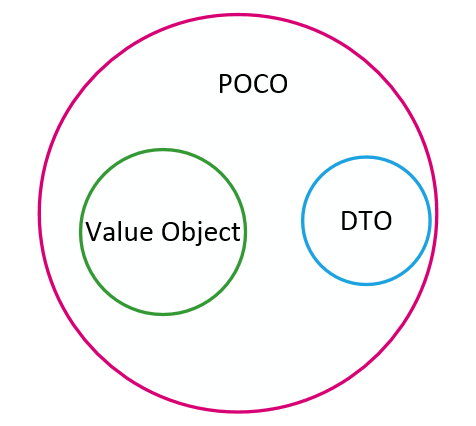
DTO vs Value Object vs POCO

http://enterprisecraftsmanship.com/2015/04/13/dto-vs-value-object-vs-poco/